Native Nextcloud Talk · Not launched yet
Nextcloud Talk, native on Mac and iPhone.
Swift and SwiftUI, on each platform’s own terms. No Electron. No web view rendering your messages. Your conversations are on screen before the first network call returns.
Not launched yet — there is nothing to download or buy today.
A good protocol, wearing a browser.
Nextcloud Talk is a sound piece of infrastructure. Its HTTP API is documented, it long-polls properly, and it is yours to host. The trouble starts at the surface: a web app in a tab, or a web app wrapped in a desktop shell, which is the same web app with a worse relationship to your keyboard.
So text selection behaves almost like text selection. On the Mac the menu bar is almost real; on a phone, it is a website pretending to be an app. Nothing is broken, exactly — it just never stops reminding you where it came from.
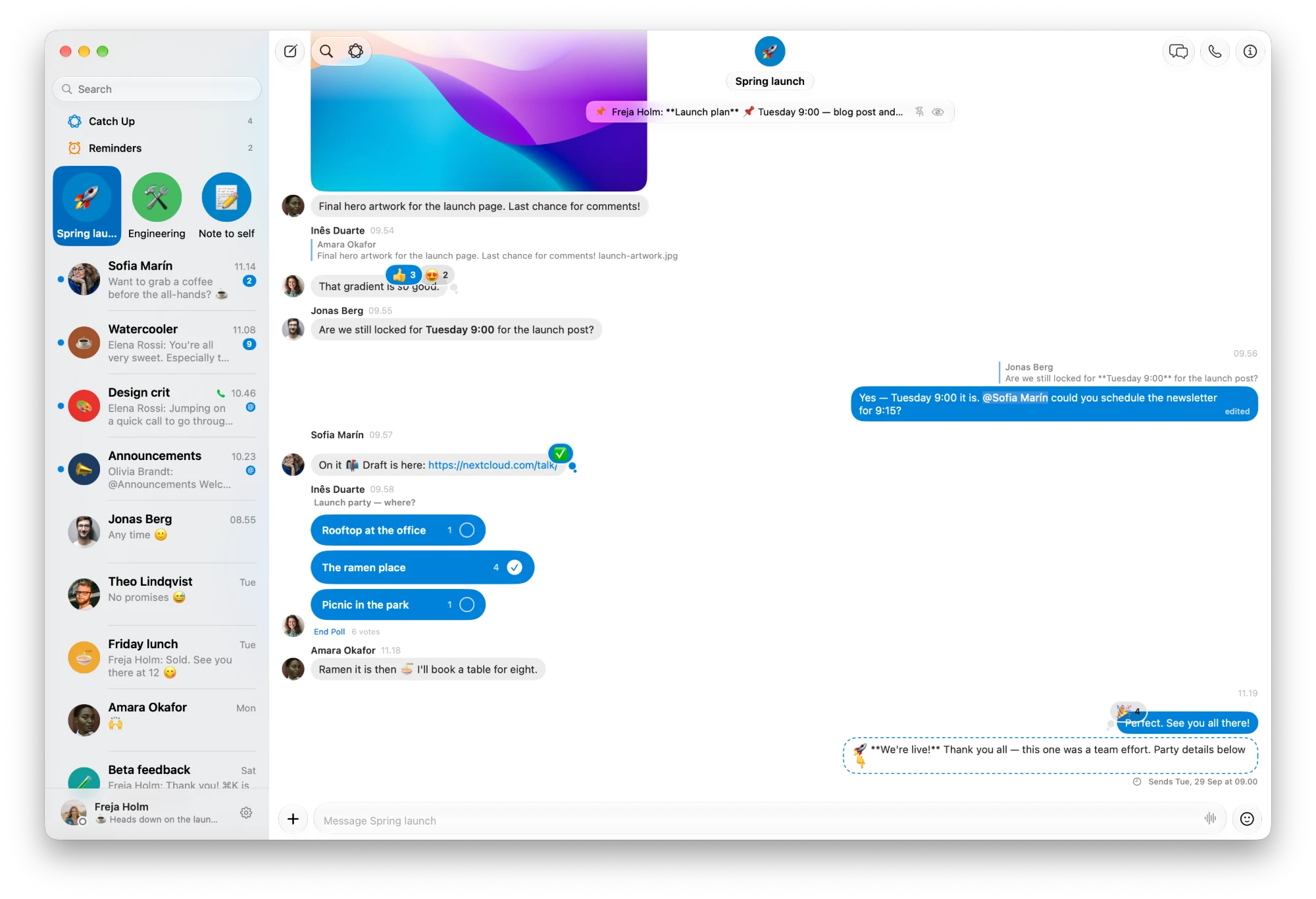
kvidr takes the other half of the deal. Nextcloud is the backend and the protocol; Apple’s own Messages is the benchmark for how it should feel, on the Mac and on the iPhone. Where the two disagree, kvidr follows the platform.
Six promises, written as acceptance criteria.
- 01
Instant
The cached conversation list is on screen before the first network call returns. Opening a cached conversation shows its messages in the same runloop turn.
- 02
Native
The platform’s own controls, menus, text selection and navigation — and on the Mac, real menu bar commands and window restoration. Not approximations of them.
- 03
Trustworthy unread
A message is never marked read because it was downloaded. Only because it was selected, in a key window, and actually put in front of you.
- 04
Never janky
Scrolling a ten-thousand-message conversation stays smooth. One incoming message re-renders one row, not the whole transcript.
- 05
Calm
Errors are quiet inline state, not modal alerts. Loading states are subtle. There is no spinner on launch.
- 06
Offline-tolerant
No network means a slightly dimmer app, not an error page. Everything already fetched stays readable, and drafts survive quitting.
Everything you actually do in a day.
Everything below is built into the Mac app ahead of launch; the iPhone app is being built on the same foundations. Every feature is gated on what your server reports it can do, rather than on a version number — so anything your Nextcloud lacks is hidden, not broken.
- 04ConversationsEverything Talk can say, drawn natively.
- 05CallsCalls in the app, not in a browser tab.
- 06Apple IntelligenceHelp that never leaves your Mac.
- 07Staying on topDeal with it now, or be reminded later.
- 08Finding thingsAnything, one keystroke away.
- 09Around the MacAt home in the rest of macOS.
- 10For moderatorsRun a conversation without opening the web app.
Everything Talk can say, drawn natively.
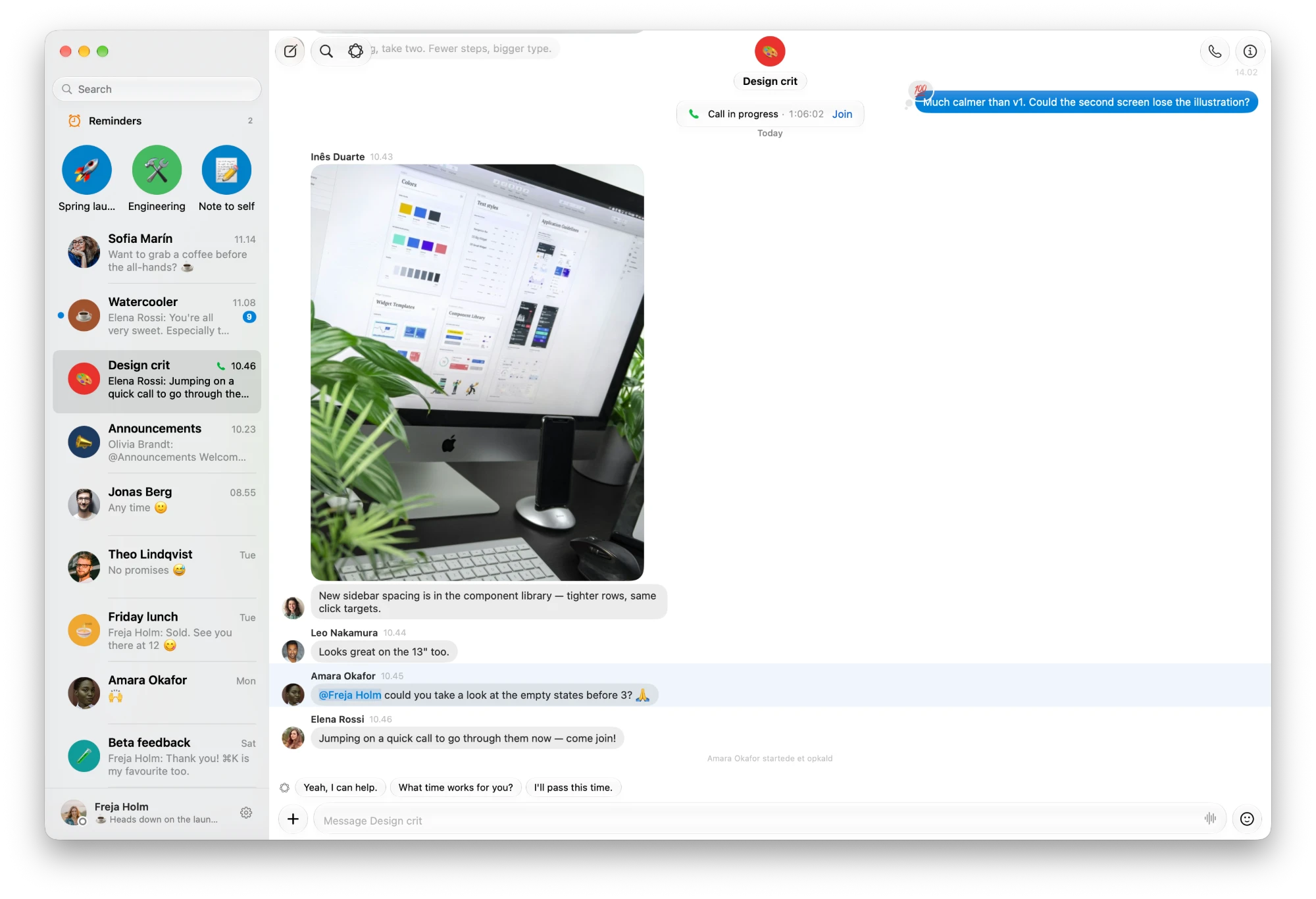
Bubbles, a floating composer and a transcript that scrolls like one. Markdown, mentions, links, code, polls and pictures are rendered as real text and real controls — never as HTML, and never in a web view.
- Replies, reactions and edits
- Reply, react, edit or delete wherever the server allows, with a who-reacted popover. Reply privately to someone in a group, or forward a message to another conversation.
- Polls
- Read them, vote in them, and end the ones you started. Results update as other people vote.
- Threads
- Start a thread from the + menu, find a conversation’s threads in the toolbar, and rename or mute each one.
- Pinned messages
- What matters sits in a bar over the transcript. Moderators pin and unpin.
- Send later
- Schedule a message for tomorrow morning or any time you choose. It waits at the foot of the conversation, where you can change or cancel it.
- Voice messages
- Record them from the composer. Play them with a waveform you can scrub, with what was said written out underneath — transcribed on this Mac.
- Pictures and files
- Drag and drop, paste or ⇧⌘A, with real upload progress. Pictures show at a size worth looking at, and Genmoji go as pictures too.
- Typing, and read markers you can trust
- See who is typing, as they type. A message counts as read only once it has actually been in front of you.
Calls in the app, not in a browser tab.
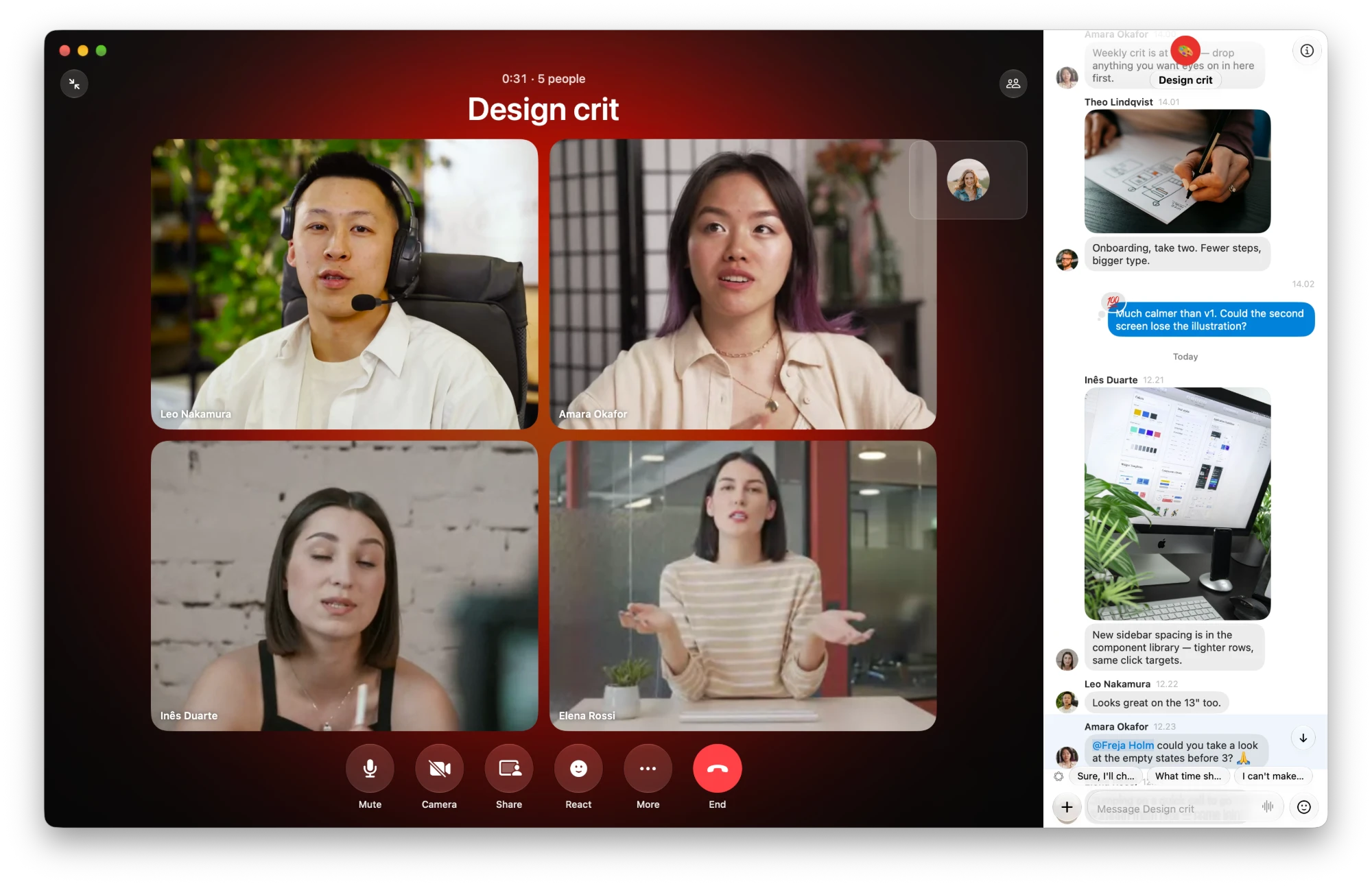
Audio, video and screen sharing, spoken directly to your server’s media server. The call takes the window with the conversation beside it; minimise it, and a green pill takes you back.
- Audio and video
- Tiles resize to fit everyone, and a ring shows who is talking. Switch microphone and speaker mid-call — AirPods included.
- Calls that ring
- An incoming call rings, with Accept and Decline over your messages — and a notification when kvidr is in the background.
- Screen sharing, both ways
- Share a window or a whole display. While you do, a small glass call floats over your work. When someone else shares, their screen takes the stage.
- Raise hand and reactions
- Raise your hand with ⇧⌘R, or send a reaction. Talk’s web and phone apps see them, and kvidr shows theirs.
- People in the call
- Who is there, raised hands first, with microphone and camera state. Moderators can mute someone, and end a call for everyone or just leave.
- Live Captions
- What is said, written out as it is said, under each speaker’s name — by Apple’s speech models, on this Mac.
Calls need Talk’s High Performance Backend on your server: kvidr makes calls only through one. Everything else on this page works without it.
Help that never leaves your Mac.
Summaries, catch-ups, suggested replies and translation, written by Apple’s on-device models. Your messages are not sent anywhere to be read, and your server does not need an AI provider.
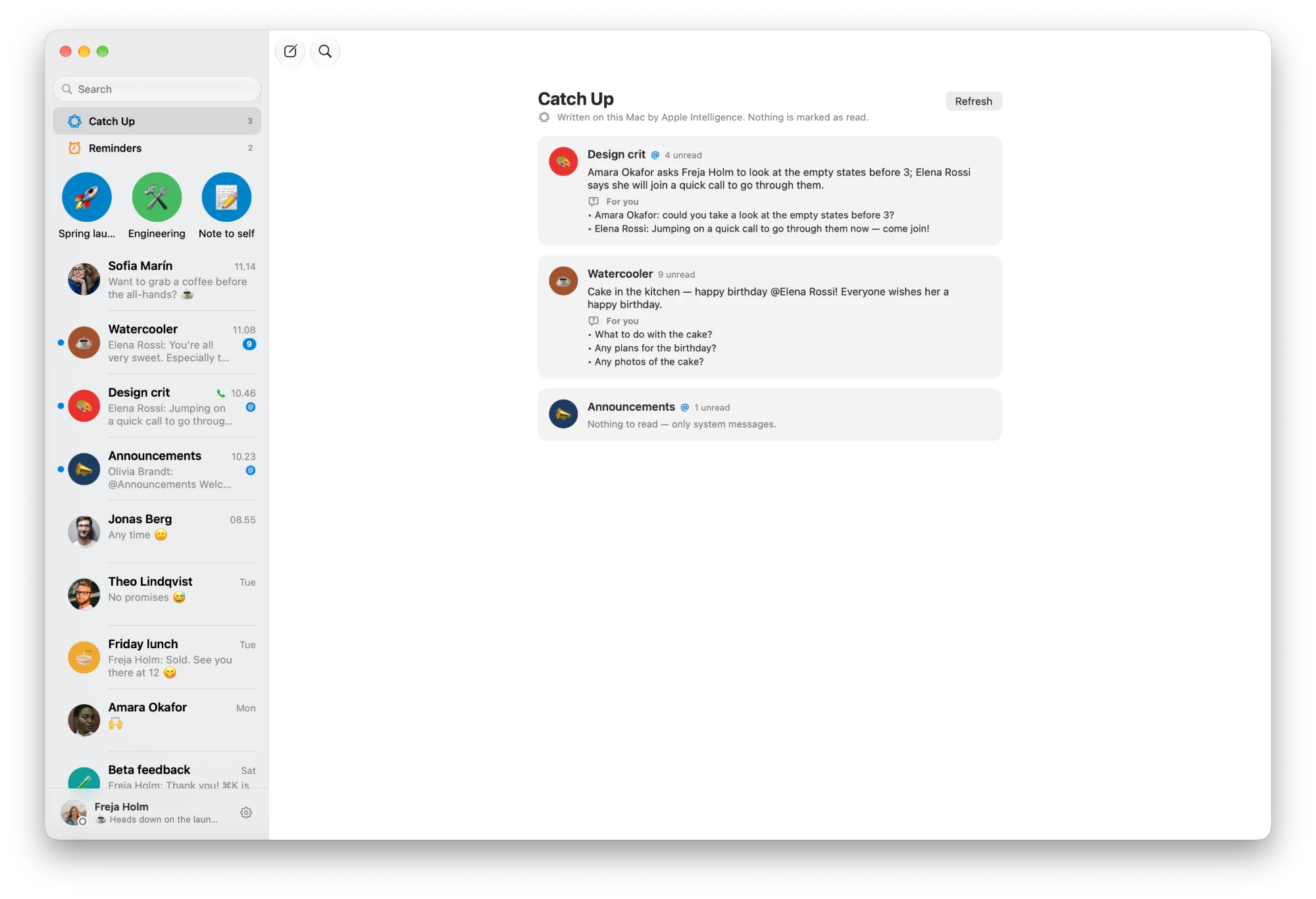
- Catch Up
- With several conversations unread, one page says what happened in each and what is asked of you. Nothing is marked as read.
- Summaries
- Summarize a conversation with ⌥⌘S — what is unread, the last day or the last week — or a whole thread, or a long voice message.
- Ask a conversation
- Ask a question with ⌥⌘A and get a short answer, with links to the messages it rests on. If it was never said, it says so.
- Suggested replies
- Three short replies over the field when someone writes to you. A click puts one in the field; nothing is ever sent for you.
- Translation
- Translate a message, or everyone’s automatically. Translate your own draft before you send it.
- Writing Tools
- Apple’s Writing Tools, in the composer: proofread, rewrite or make it shorter before it goes.
- Into Calendar and Reminders
- A message that names a day and a time becomes an event; one that asks something of you becomes a to-do.
- Live Text in pictures
- Select the words in a shared screenshot, and open the links, phone numbers and QR codes in it.
Catch Up, summaries, Ask, suggested replies and Writing Tools need a Mac with Apple Intelligence turned on; without it, they stay out of the way. Translation, Live Text and adding to Calendar and Reminders work either way.
Deal with it now, or be reminded later.
Remind yourself of a message tomorrow at nine. Sort conversations into sections of your own. Mark the ones that matter important, and keep the sensitive ones out of sight.
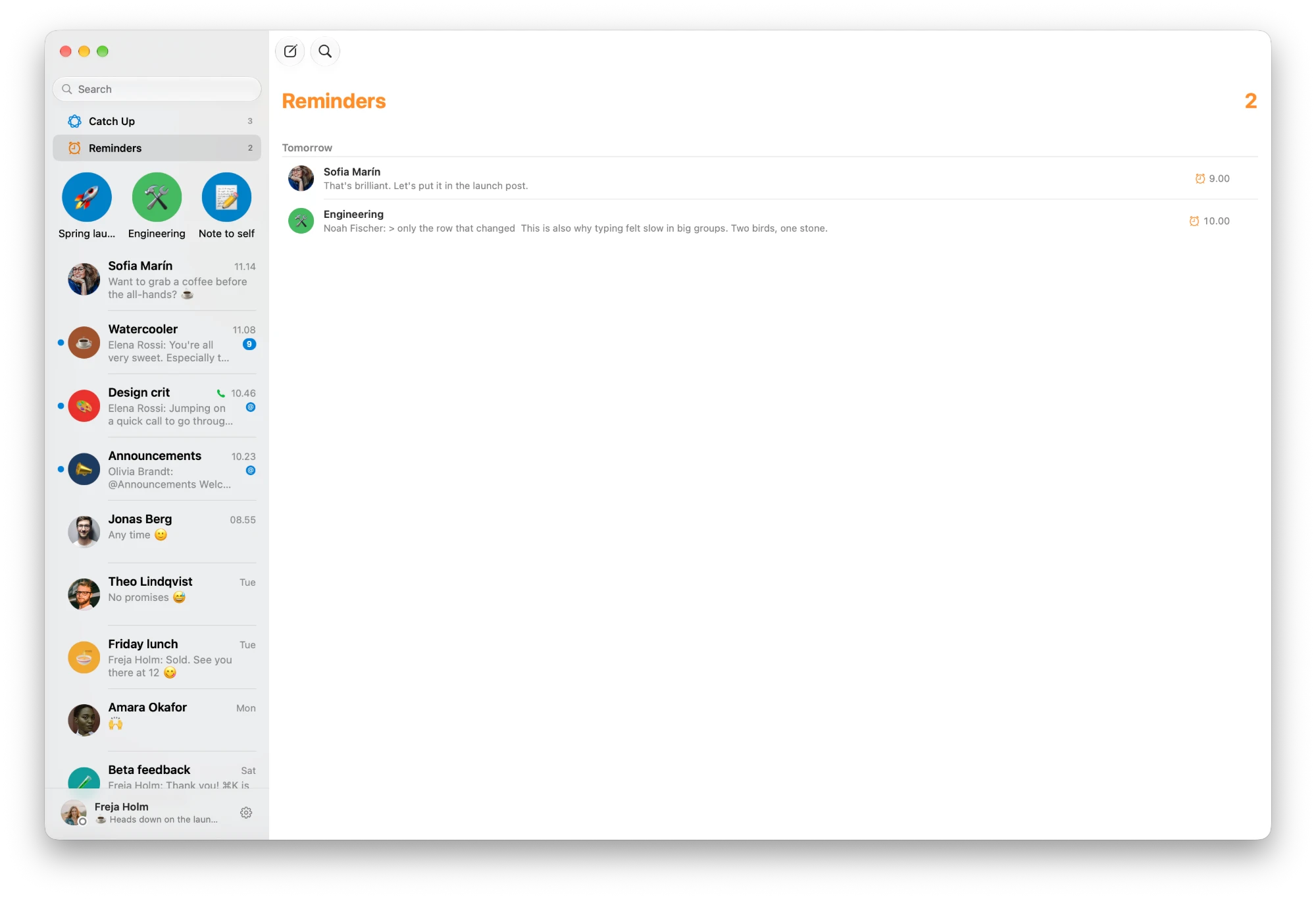
- Reminders
- Right-click a message → Remind Me: later today, tomorrow, next week, or a day and time you pick. They are listed in the sidebar, and go off on time.
- Favourites as faces
- Favourites sit at the top of the sidebar as pictures, in the order you drag them into.
- Tags
- Sections of your own in the sidebar, shared with Talk’s web and iPhone apps. Fold the ones you don’t need right now.
- Important and sensitive
- An important conversation notifies you even on Do Not Disturb. A sensitive one keeps its messages out of the sidebar and notifications.
- Archive
- Put finished conversations away without leaving them. They are one click from the sidebar.
- Notifications
- Banners and a Dock badge, with a preview-free mode for when your screen is shared. Mentions and calls arrive promptly while kvidr runs.
- Status and out of office
- Set your status and picture from Settings. In a one-to-one, see when the other person is away, until when, and who is standing in.
Anything, one keystroke away.
⌘P opens a command palette in Spotlight’s shape: conversations, people, messages and every command in the app, from one field.
- Go to anything
- ⌘P for everything, ⌘K for conversations alone. ⇧⌘] jumps to the next unread one.
- Search the server
- ⇧⌘F searches your whole message history on the server — every conversation, or just this one — and takes you to the message.
- Find in a conversation
- ⌥⌘F finds in the open conversation, instantly, and ⌘G steps through the matches.
- New message
- ⌘N writes a new message the way Mail does: a To: field that finds people with Nextcloud’s own search, and a message under it.
- The inspector
- ⌥⌘I opens a third column: the conversation’s details, its participants, and the files shared in it, by kind.
At home in the rest of macOS.
kvidr turns up where the rest of your Mac already looks, and speaks its language.
- Siri and Shortcuts
- Send a message, open a conversation, call, or catch up — from Siri or from a shortcut. In English and in Danish.
- Spotlight
- Conversations show in Spotlight with their last message. Sensitive ones don’t.
- Raycast and links
- Script commands for Raycast, and kvidr:// links to open a conversation, start a draft or run a search from anywhere.
- English and Danish
- kvidr follows your Mac’s language, or one you choose for it alone. More languages have room to follow.
- Liquid Glass
- On macOS 26, glass on the floating layer — message actions, panels, reaction pills — and deliberately not on your messages, which are content.
Run a conversation without opening the web app.
If you look after a conversation, the settings you reach for are in the inspector — and only shown to people allowed to use them.
- Conversation settings
- Rename, describe, make read-only, let messages expire, and share by link with a password.
- Participants
- Invite people with Nextcloud’s own search, and remove them.
- Lobby
- Keep a conversation closed to everyone but moderators until you open it, or until a time you set.
- Breakout rooms
- Split a group into rooms, by hand or by choice; message every room at once, answer when one asks for help, and bring everyone back.
- Bots
- Switch the server’s bots on or off for a conversation.
On the Mac, the whole app without the mouse.
Every command has a shortcut, and ⌘/ opens a window listing all of them. A representative handful:
- ⌘PGo to anything — conversations, people, messages, commands
- ⌘KGo to conversation
- ⌘FFind a conversation
- ⇧⌘FSearch messages on the server
- ⌥⌘FFind in conversation
- ⌥⌘↑or⌥⌘↓Previous / next conversation
- ⇧⌘]Next unread conversation
- ⇧⌘KFocus the message field
- ⌘↑Edit your last message
- ⇧⌘RReply to the newest message — or, in a call, raise your hand
- ⇧⌘UMark as unread
- ⌥⌘SSummarize conversation
- ⌥⌘AAsk this conversation
- ⇧⌘AAttach a file
- ⌘NNew message
- ⌥⌘IShow conversation details
- ⌘/Keyboard shortcuts
In development
Next: the iPhone.
An iPhone app is in development, built the same way as the Mac app: Swift and SwiftUI, talking directly to the documented Nextcloud Talk APIs, with no web view anywhere near your messages.
The Mac app already keeps everything below the interface in its own Swift package, with no SwiftUI in it. That is what makes an iPhone app a second interface rather than a second app.
It is not ready, and there is no date yet. Join the launch list at the bottom of this page to hear when it is.
Illustration — the iPhone app is in development
Your password is never typed into this app.
kvidr signs in with Login Flow v2. You type a server address; the app opens your browser; you approve it there; the app receives a device-specific app password. Your actual Nextcloud password is never typed into, and never seen by, this application.
That app password lives in the macOS Keychain — never in preferences, never in the cache, never in a log — and it is revoked the moment you remove the account.
The rest of the posture follows from the same instinct:
- HTTPS is required. Plain HTTP is possible only for
localhostand private-network addresses, and only after you turn it on deliberately. - No remote HTML and no remote JavaScript, anywhere in the message pipeline. There is no
WKWebViewrendering chat content, so there is nothing for a message to execute in. - The live connection for typing, instant updates and calls signs in with a short-lived token that Nextcloud hands out — never with the app password.
- What kvidr keeps on disk — the message cache, pictures and avatars — is encrypted with a key for your account, and shredded when you sign out.
- Summaries, translation and transcription run on this Mac, with Apple’s own models. Nothing is sent to anyone else’s to be read.
- There are no credentials in the repository, and no analytics inside the app.
All of which you can check rather than take on faith — the source is on GitHub.
A narrow tool. Here is exactly how narrow.
This is not for everyone, and pretending otherwise would waste your time. If any line below is a no, kvidr is not yet for you.
- On the Mac: macOS 26 or later
- The app targets macOS 26 and uses Liquid Glass on its floating layer. There is no build for earlier versions.
- An iPhone — soon
- The iPhone app is in development. What it needs will be listed here when it ships, not guessed at before.
- A Nextcloud server with Talk
- Your own, or one you have an account on. kvidr is a client; it hosts nothing and stores nothing on anyone else’s behalf.
- A signed build at launch, or Xcode 26
- There is no signed build yet. Until there is, the source is public: compile it in Xcode 26 and sign it with your own Apple developer account.
- For calls: a High Performance Backend
- kvidr makes audio and video calls only through Talk’s High Performance Backend. Without one on your server, there are no calls in kvidr — and nothing else depends on them.
- For summaries: Apple Intelligence
- Catch Up, summaries, Ask, suggested replies, Writing Tools and Genmoji need a Mac with Apple Intelligence turned on. Translation, transcription and everything else do not.
Get an email the day kvidr launches.
Nothing is out yet: no download, no App Store listing. Leave your email and you will hear when the Mac app launches, and again when the iPhone app does. Launch news only — no newsletter, and unsubscribing takes one click.